2026 · Martial Arts Gyms · 4 weeks
AI-Powered Onboarding Scoped for Fast Testing
How I transformed a PM’s vibe-coded prototype into a focused solution designed to help customers get value faster.
AI Feature
AI Design
Scope
Product Strategy

The Business Problem
For this gym management software, churn was increasing during the first 3 months of sign-up. Product saw an opportunity to speed up the onboarding process with an AI feature, shortening the window of time-to-value, and therefore hopefully improving early churn.
Early Churn Increasing
Customer churn is spiking within the first 3 months. The hypothesis is onboarding is the cause.
High Internal Costs
Onboarding Specialists spend time on calls and entering data manually instead of focusing on customer growth.
No Free Trial Option
Competitors offer a free trial option, but we can't without a self-serve onboarding option.
AI Business Mandate
Leadership is pressuring PMs to use AI where it makes sense, and this could be our opportunity.
PM asked for:
Faster onboarding
Increase setup time significantly.
AI-enabled setup
Use an AI data scrape that removes manual entry.
Self-service flow
Shift the heavy lifting away from Onboarding Specialists.
PM's AI Vibe-Coded Prototype
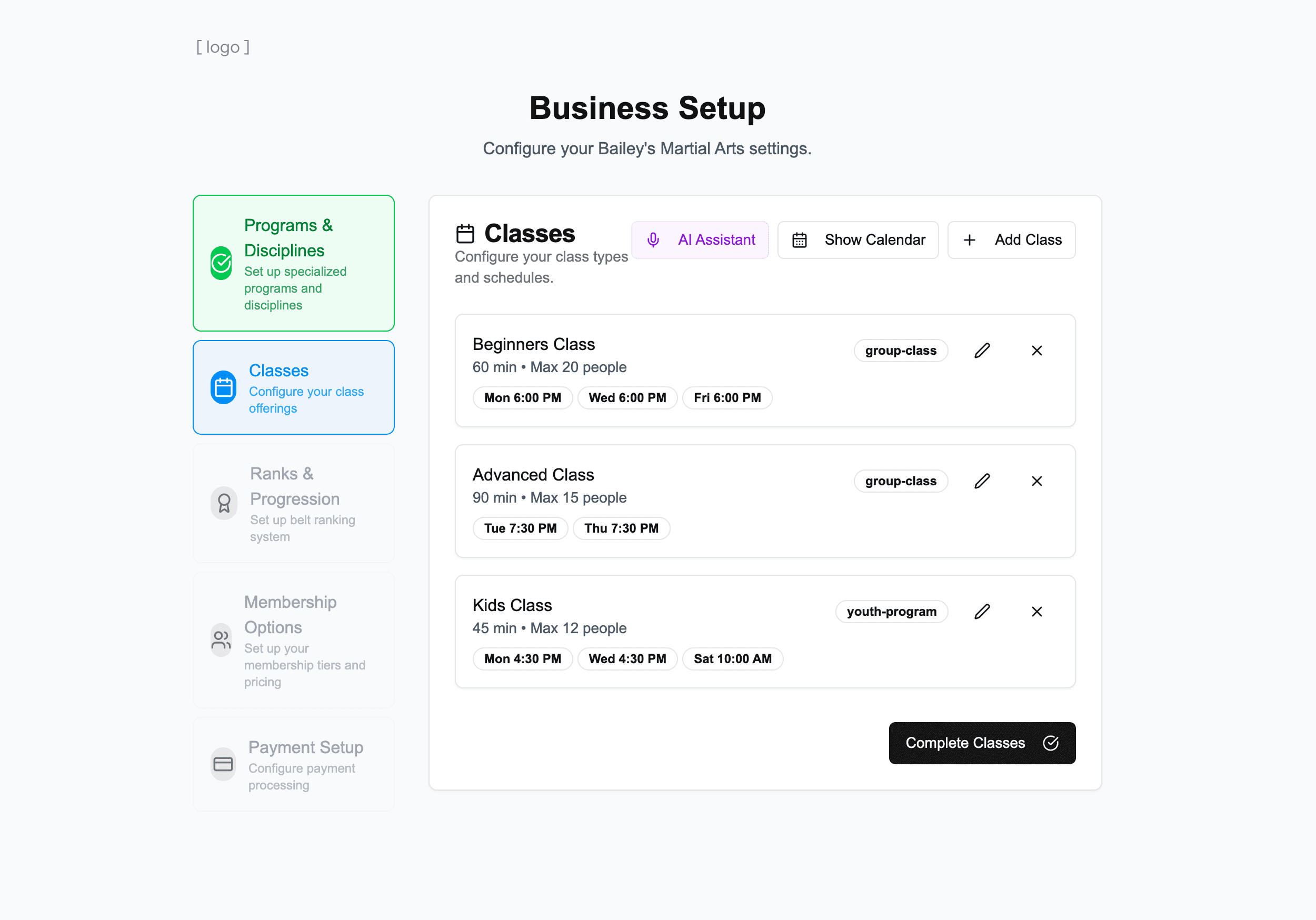
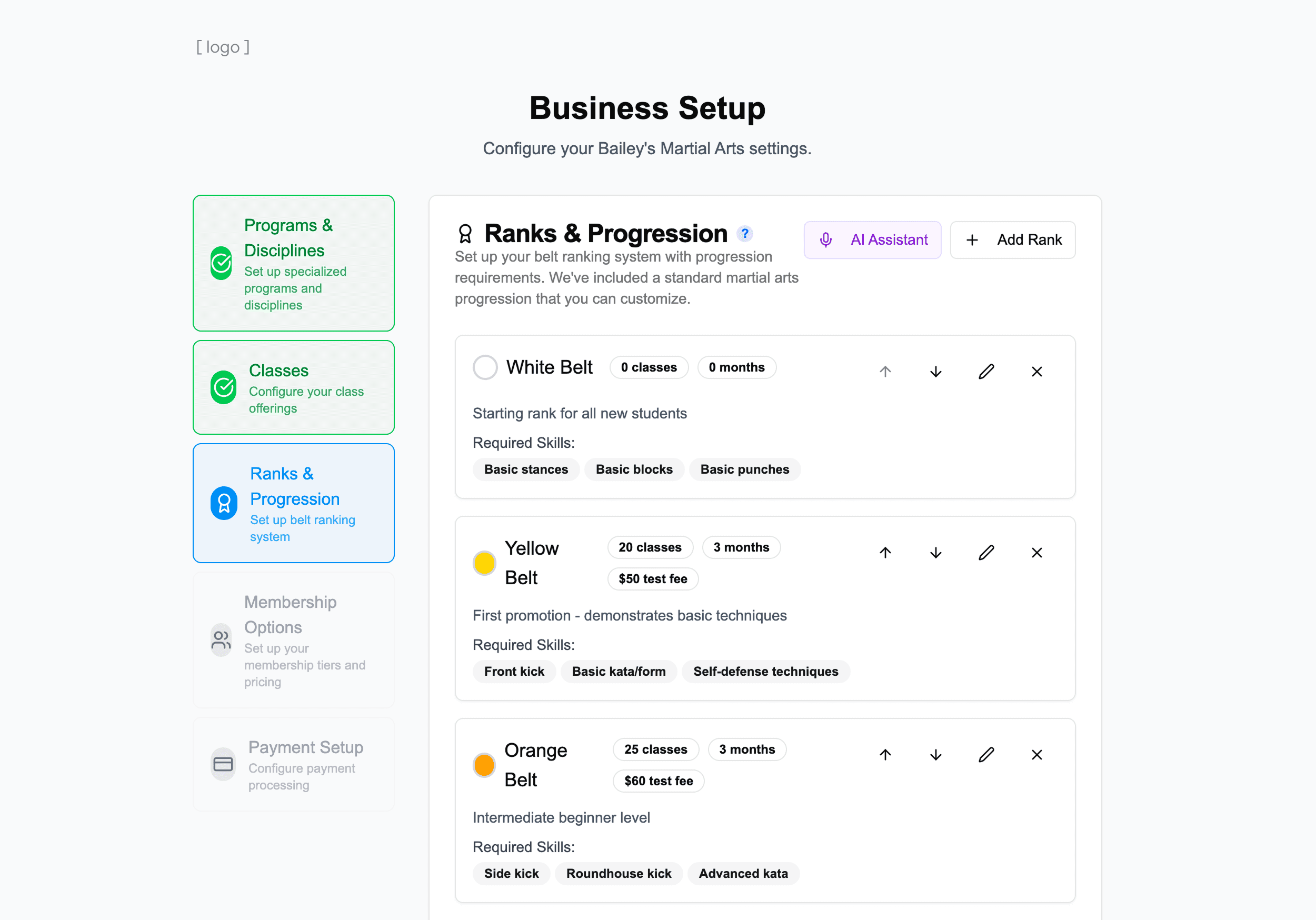
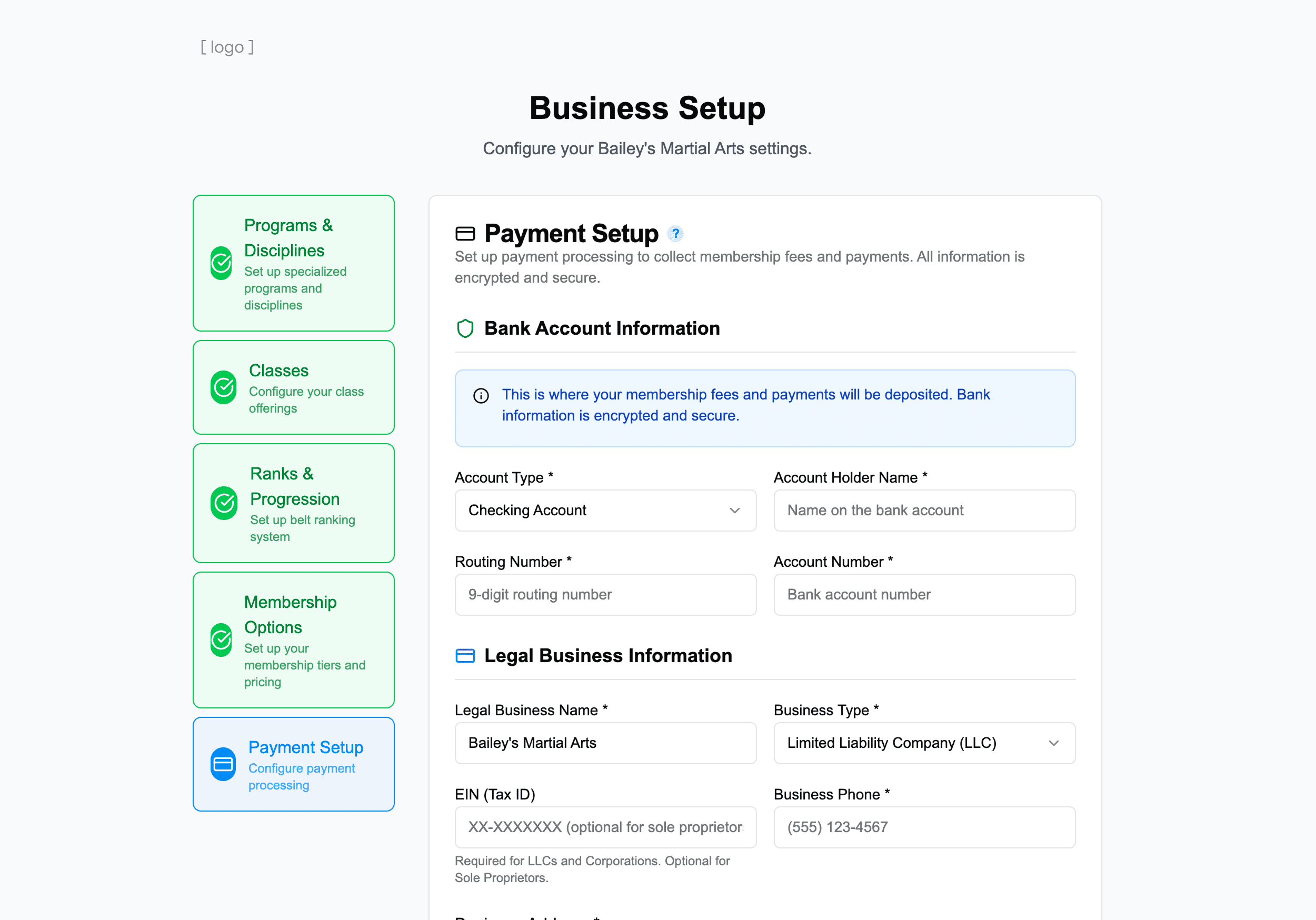
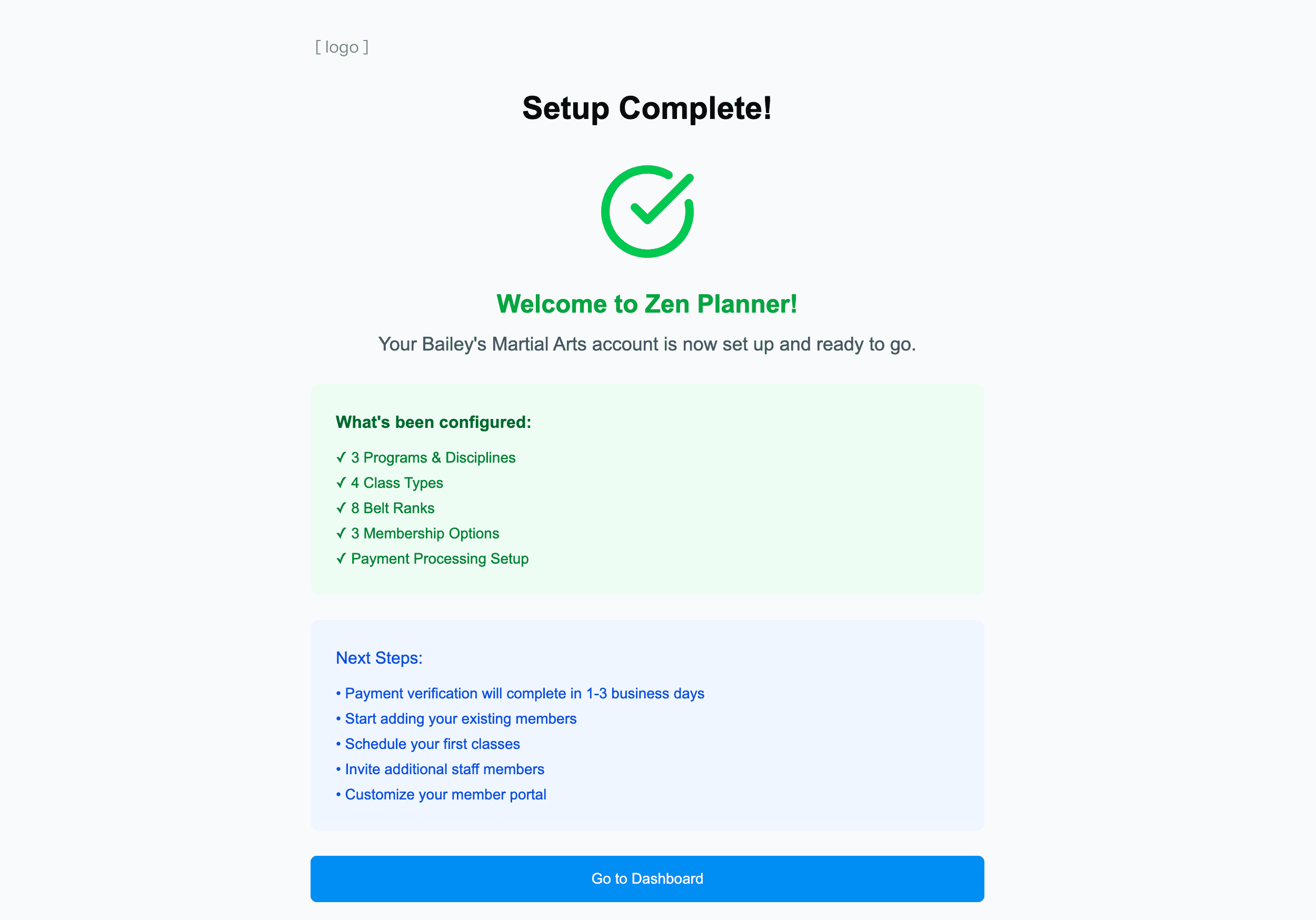
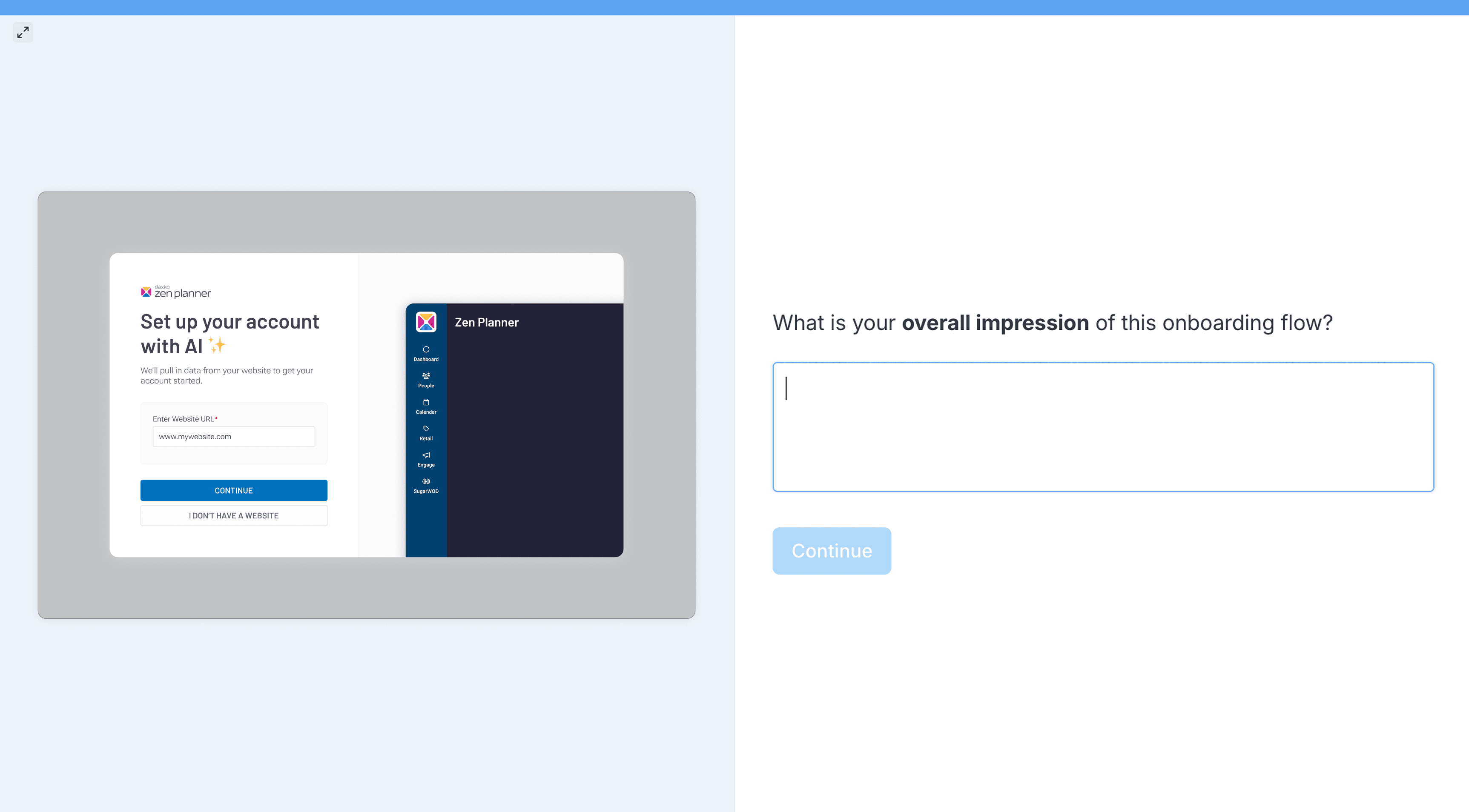
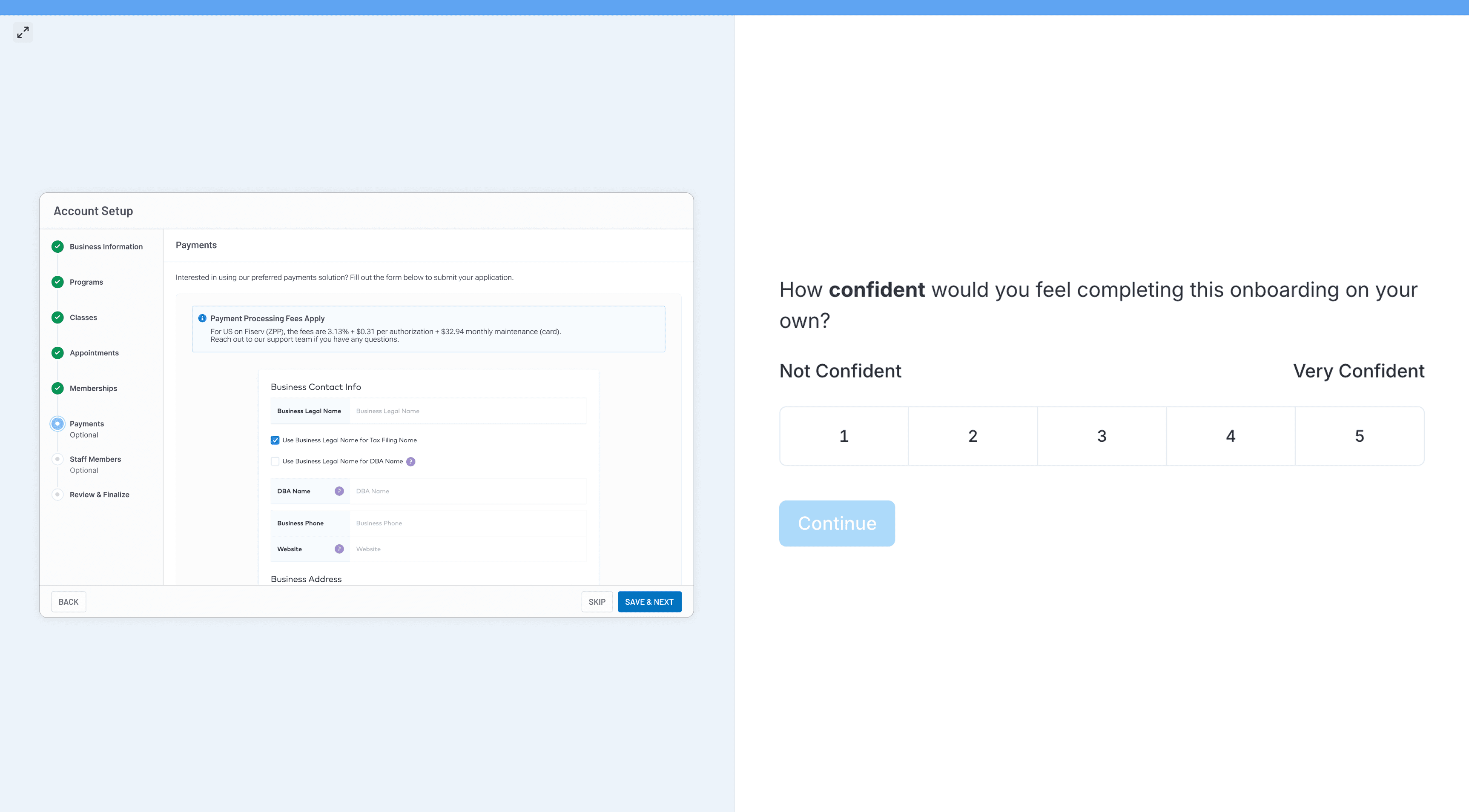
During intake, the PM showed their vibe-coded prototype of a solution idea. This was interesting — it made the PM's mental model visible. The prototype showed an onboarding flow before the user enters the product. A multi-step wizard uses AI to scrape data from the user's website, then AI fills out setup fields automatically.
The PM's AI Prototype
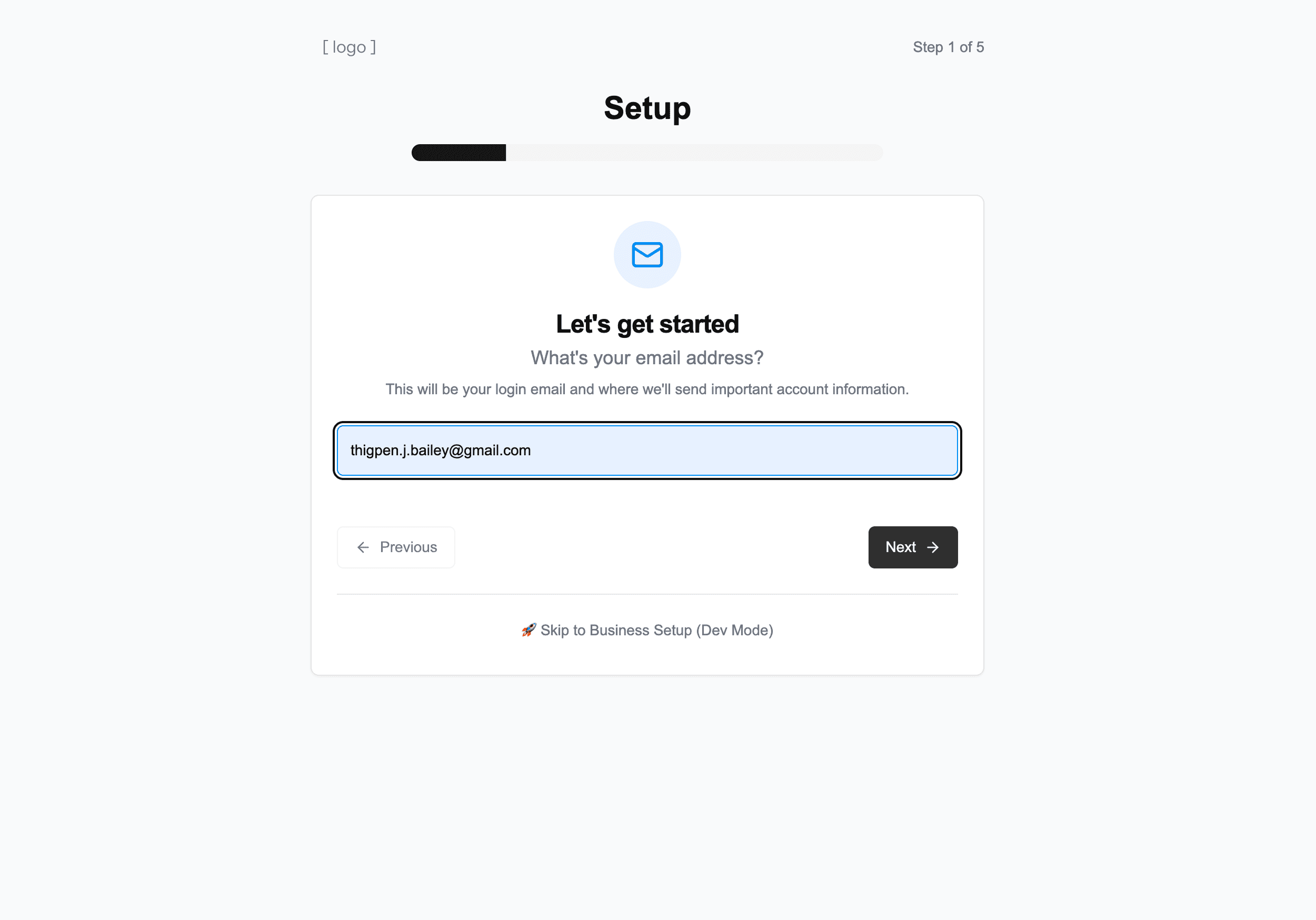
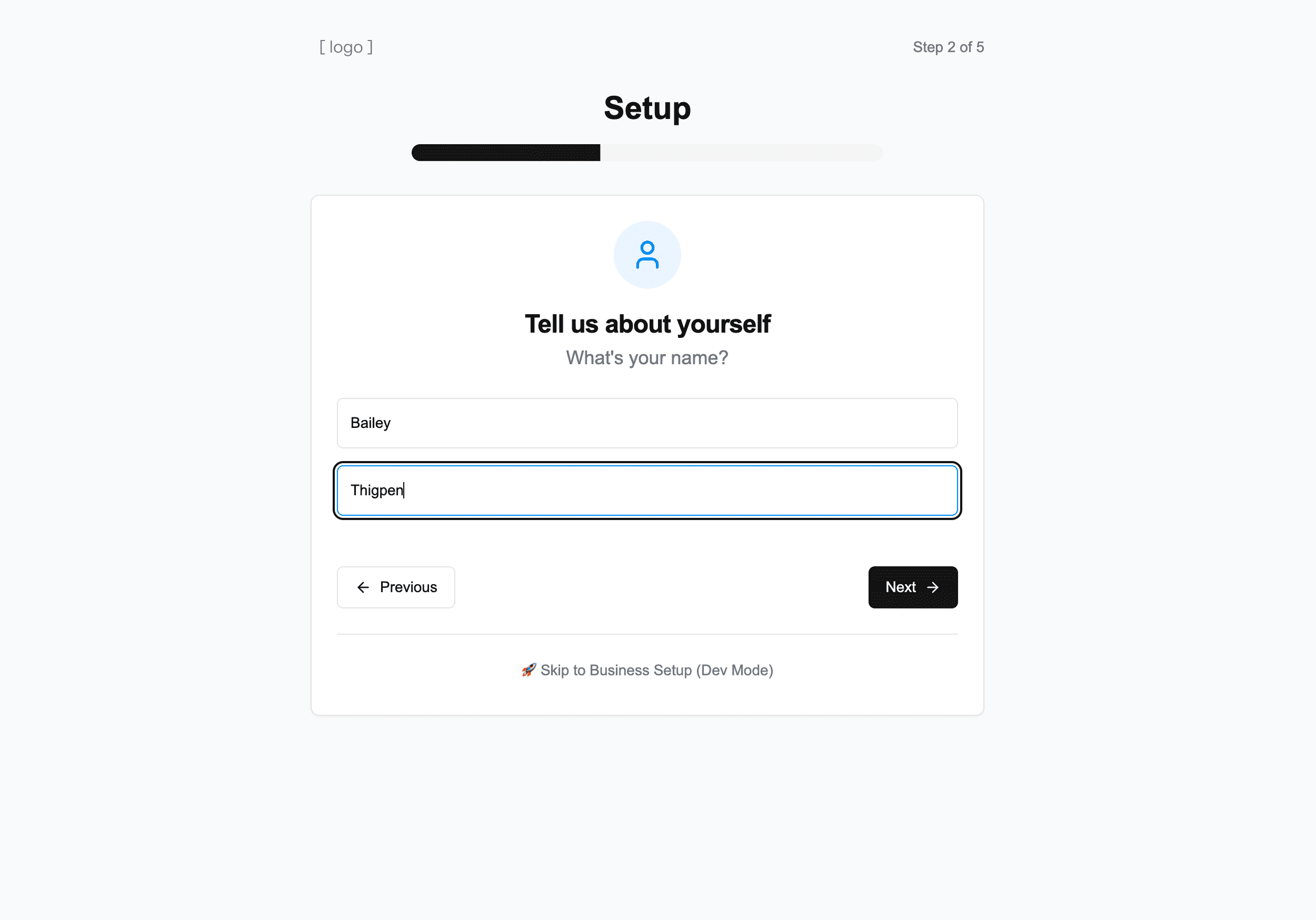
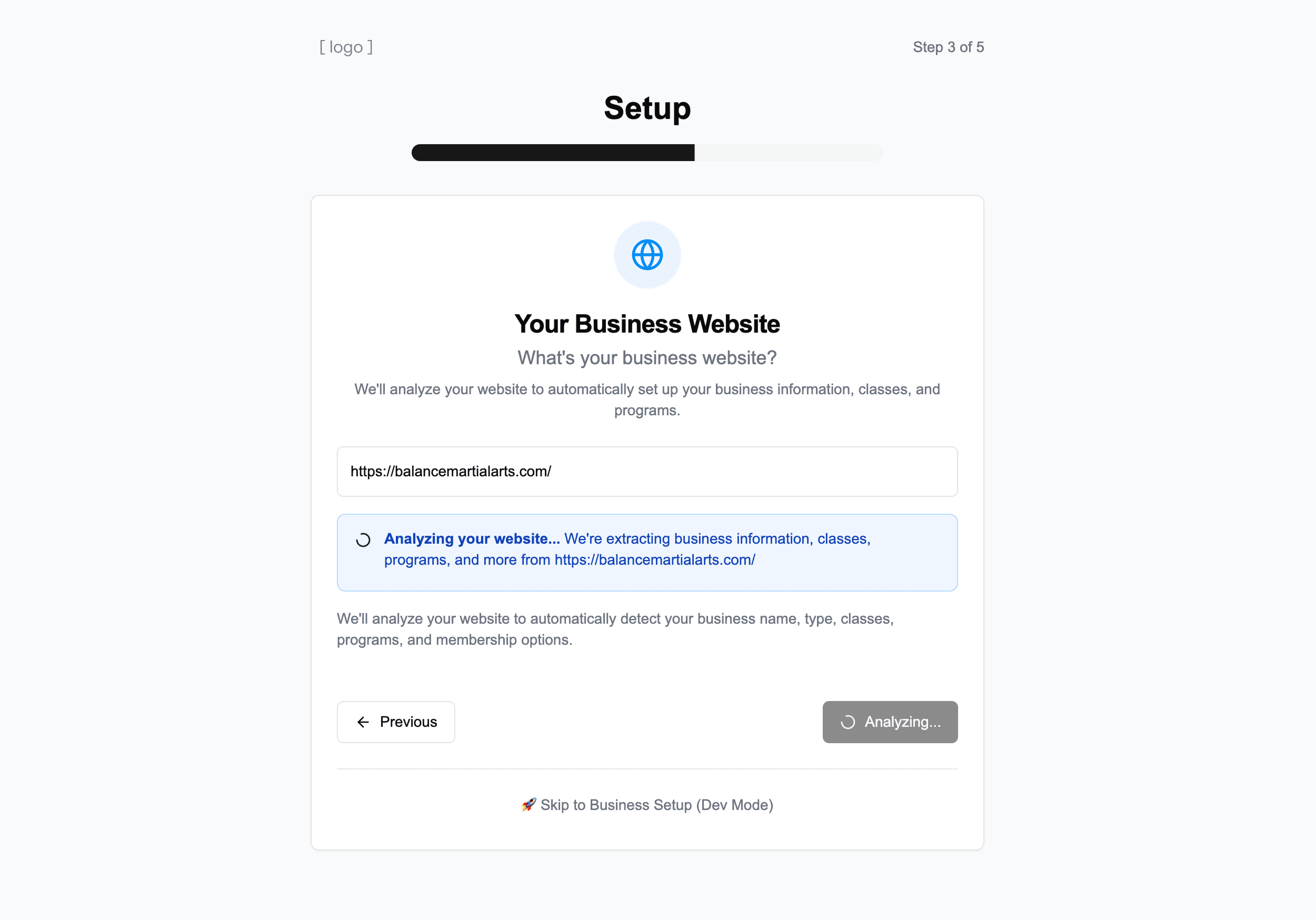


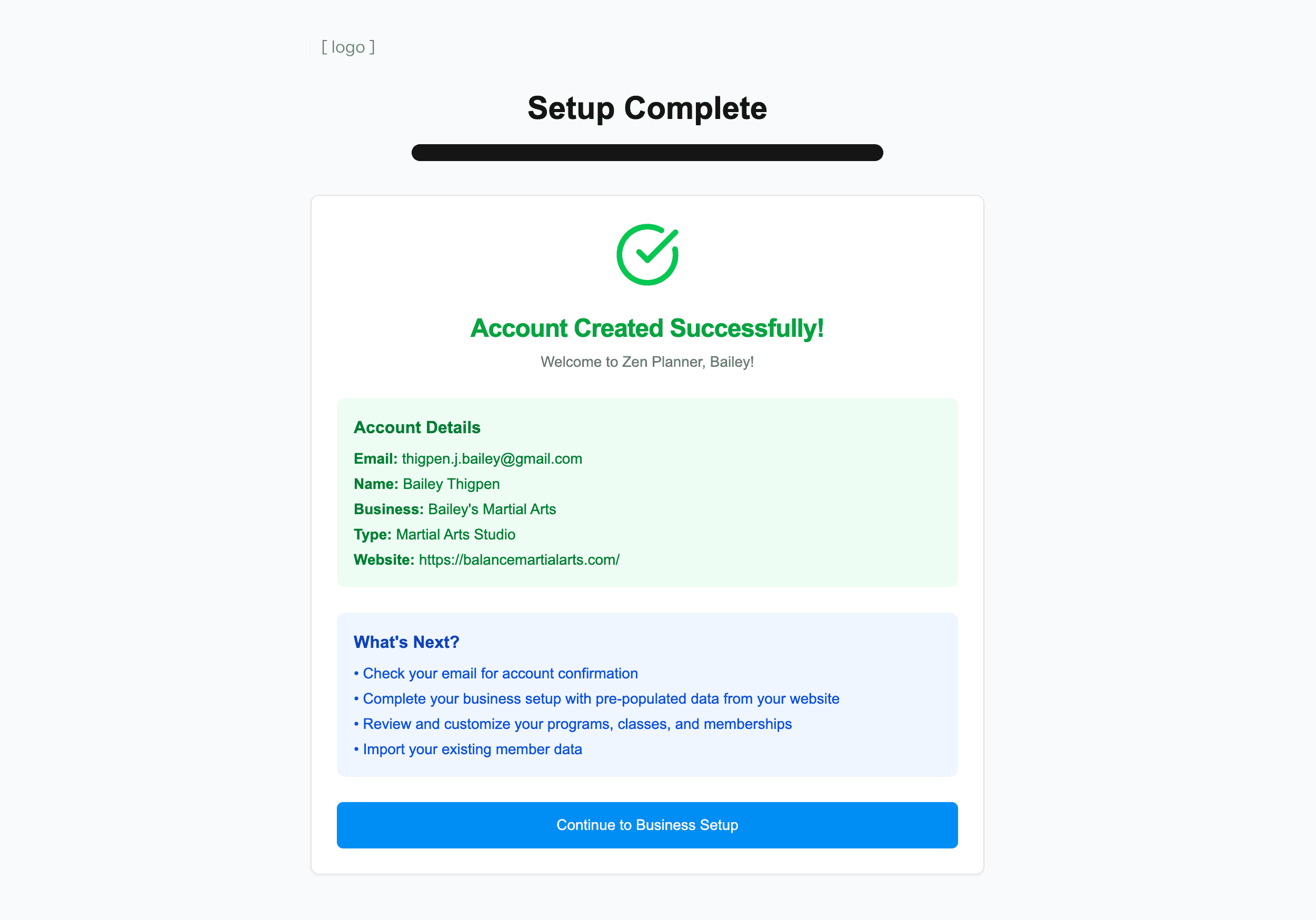


Reactions:
Promising idea to use AI to reduce manual data entry, but is this solving the real problem?
Why create a separate onboarding experience instead of improving the existing in-product setup UX?
Eng and design effort is high to rebuild our setup pages thoughtfully in a new UX. Is this the best investment now?
Users will encounter a different in-product configuration experience when they inevitably need to make edits.
This assumes the setup flow is linear and the same for every customer. Is that true?
Users will still have to manually review everything AI creates. It's only beneficial if it's accurate, so how can we test this?
Do our users have the required material (a website, or other sources?) to provide clear, scrape-able data?
This ~12-step flow actually feels like a lot of upfront work, is all of this required?
Users will be blocked from other areas of the product until setup is finished. Could this cause friction?
MY TAKEAWAY
PM identified a legitimate business problem and proposed a solution. I recognized the opportunity, but challenged the assumptions embedded in the solution. I needed to investigate further to take this from a solution hypothesis to a concrete design direction.
Research Insights That Changed Everything
I investigated the underlying user and business problems, and identified where the proposed approach introduced potential new friction, to help the team converge on an effective product strategy.
Churn survey data + discovery interviews:
What we expected
Users would say onboarding was slow and painful. We predicted frustration with the multiple required meetings and lack of autonomy.
What we found
Users actually rated their onboarding experience pretty highly. It was after "onboarding" (when they didn't have a specialist's help anymore) that friction arose — knowing what to prioritize and dealing with time consuming data entry.
KEY INSIGHT
Learning the product is key. Users easily watched the OnSpe complete tasks, but struggled on their own later.
End-to-End Customer Journey Mapping
My PM and I conducted dozens of discovery interviews, both internal and external. This confirmed customers feel overwhelm early as they learn our product, prioritize tasks, and try to get the software configured quickly to schedule classes and get sign-ups.
Friction also extends beyond the product, creating opportunities across Sales and Customer Success to improve the broader onboarding journey.

KEY INSIGHT
Users start seeing value when they schedule a class and members sign-up. Not all setup has to be completed before that can happen.
In-Product Onboarding Tasks
The most beneficial resource! I watched dozens of recorded Onboarding calls with real customers to map out the actual in-product steps. Some questions and thoughts going in:
What the Specialist was doing for them?
Which steps take longer than others, why?
Which steps are just tedious vs actually difficult?
What info does the user already have elsewhere?
Where does the user get confused or overwhelmed?
How did they navigate through the process? (linear?)
What requires extra learning or help?
What requires human expertise or judgement?

KEY INSIGHTS
Manual configuration is definitely time consuming and a point of friction.
The process isn't linear — they naturally jump between tasks.
Learning is key. Everything can't be completed in these calls, so the user must finish the process on their own.
Testing the AI Prototype
I quickly refined the PM's AI prototype using Magic Patterns (correcting UX and content mistakes to not distract users from the concept) and tested it via Lyssna with users who had completed onboarding in the past year. We asked for their impressions, comparisons to their actual experience, concerns, and confidence in the approach.




KEY INSIGHT
Users appreciated a prioritized path and less data entry, but were concerned about AI accuracy and how this separate UX translates to the actual product they'll have to navigate later.
The Shift in Direction
Defining how the research insights inform our product strategy and next steps.
FROM
TO
01
Scope small, test fast
Focus the beta on a few high-value setup areas, testing AI accuracy and usefulness before scaling.
02
Prioritize time to value
Help customers accomplish the most important tasks first instead of requiring complete setup.
03
Start with what customers have
Turn any existing resources (websites, spreadsheets, iamges) into a useful starting point.
04
Let AI do the heavy lifting
Use AI to reduce easy manual configuration work, not simply add an AI layer to onboarding.
05
Keep customers in the product
Leverage existing setup experiences rather than creating a parallel onboarding UI.
06
Design for learning along the way
Let customers discover and learn the product through real setup work.
Designing a Solution
A quick import analyzes existing resources to pre-populate the users account. On a new Overview page, there's a summary of imported elements that take users to existing pages to review further. Items are imported in a Draft state, allowing users to review before finalizing.
Importing Data
Upon login, user is prompted to set up their account with our AI data import.
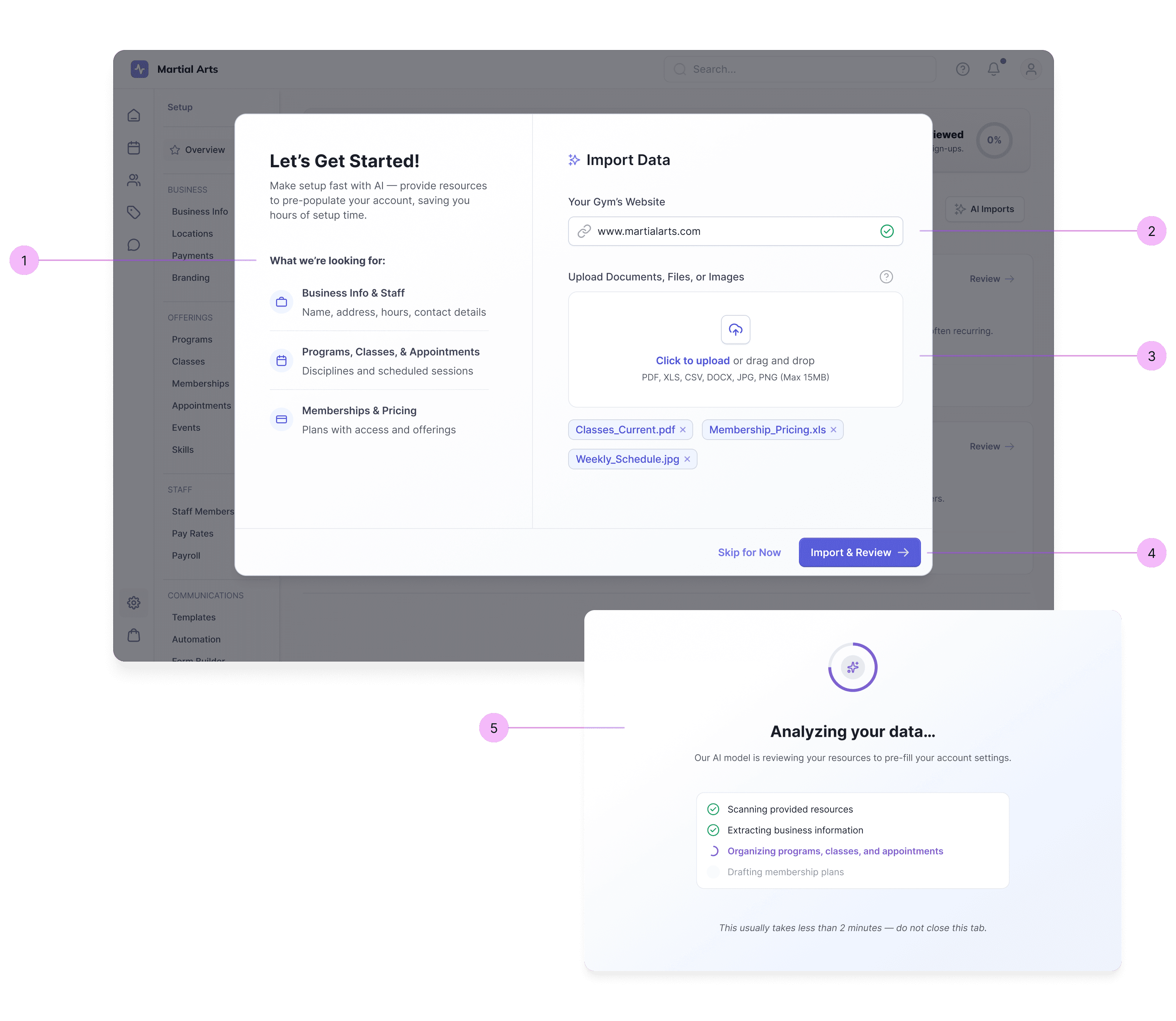
1
Relaying the prioritized assets the user needs to provide.
2
Option to submit their website, if they have one.
3
Option to upload any asset - PDFs, spreadsheets, images, etc.
4
User still has option to Skip and explore the product. They can revisit this import any time.
5
A task-based loading screen keeps users informed while they wait (only a couple of minutes).
In-Product Overview
A new page to provide priority tasks and review progress.
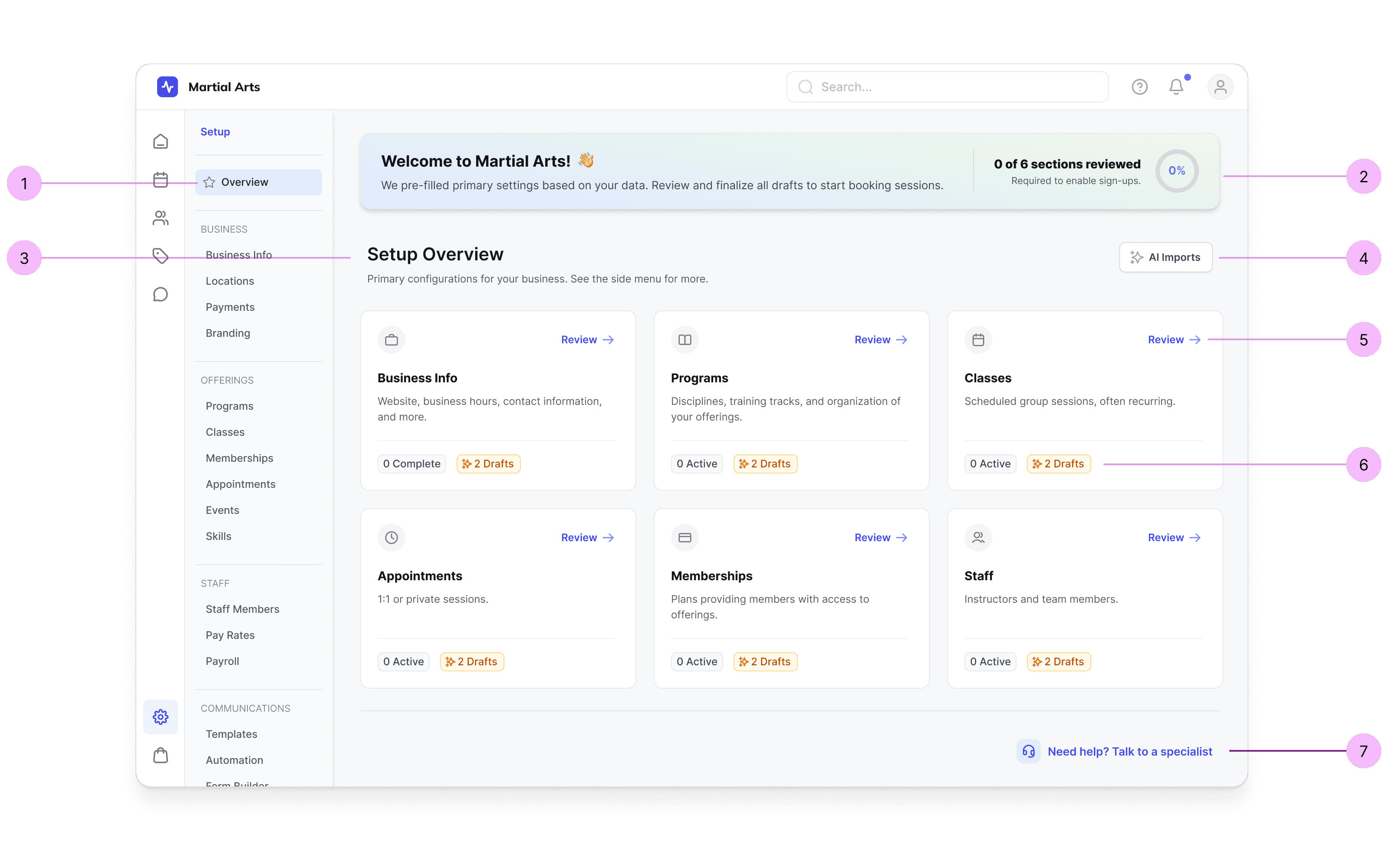
1
New page at the top of our existing Setup area in our navigation.
2
Welcome banner with information, instruction, and progress chart.
3
This section contains the priority elements a user needs to set up before they start seeing value.
4
User can view or edit assets they've added for import. (see UX below).
5
Cards take user to that element's existing page in our setup space to review the added content.
6
Imported items are saved as Drafts until the user reviews and activates them.
7
We didn't remove expert help — meeting with an Onboarding Specialist is still an option.
Reviewing Data (Memberships)
Users go to our EXISTING setup pages, with instruction to review Drafts.

1
New users haven't learned how to navigate yet, so we provide a quick link back to the Overview page.
2
Instructional banner. Draft items must be reviewed and activated.
3
Users have the option to create their own items (per usual), or Activate All in the Bulk Action menu if they prefer to move forward and correct info as they go.
4
Users click on rows to Review and Edit the newly added items.
5
As items are Activated, they change to the Active status and move to the top of the table.
Editing, Missing Info
Using EXISTING detail pages, users review content. Missing info appears in Error per usual.

1
This is the existing detail page for a Membership, in a Draft state.
2
User can't Activate until all required fields are filled out appropriately.
3
Just as the system does today, if info is missing or incorrect, the field will appear as an Error.
Re-Imports (edge case)
On the Overview page, users can edit or add their imported resources.

1
Warning that re-importing could change info in Drafts, though saved info will NOT be changed.
Basic Onboarding Complete
Overview page provides an account summary with quick links and Recommended next steps.

1
Section condenses to provide an overview of primary assets, and quick links to their setup pages.
2
Recommendations include common next steps, but are not required to start class bookings.
Engineering effort drastically reduced — only one new screen and Draft logic.
AI handles tedious actions that took up the majority of users' onboarding.
We can quickly test this AI feature's UX before changing onboarding entirely.
Users complete a small set of priority tasks to get value faster.
By using our existing setup pages, users learn the product as they go.
Free-Trial potential is unlocked, helping our competitive advantage.
Users aren't blocked from exploring the product before completing setup.
Results & Beta Testing
Some improvements were immediate and measurable from day one. Others require beta testing to validate our core hypothesis: that faster onboarding reduces time-to-value and supports long-term adoption.
Immediate Impact
User Effort Reduction
AI can pre-fill up to ~85% of the minimum required fields during setup.
Faster Path to Value
Surfaced the highest priority tasks for users to get up and running on our system.
Reduced Internal Ops
Reduced dependency on onboarding calls from 3 to 0 for self-serve users.
Free-Trial Potential
Created foundation for the business to offer a free trial tier, closing a key gap with competitors.
What We're Testing in Beta
90-Day Retention Rate
The north star. Churn in the first 3 months was the original problem - does this approach increase retention?
Time to First Value Action
How quickly users publish a class or appointment for member sign-up.
AI Data Acceptance Rate
What percentage of AI-imported data do users keep vs. override? Measures both AI accuracy and user trust.
Onboarding Specialist Help
How many users take advantage of the option to speak to an Onboarding Specialist, and what do they still need help with?
What I Learned
There was a lot to this project, and it moved incredibly fast! Here are my personal takeaways.
Lesson 1
The power of scope reduction
This project started with a massive scope: the PM’s prototype reimagined some of the product’s most core pages and workflows. With our timeline, pursuing that direction would have meant rushing into largely unvalidated redesigns before we’d even proven that AI-powered setup could solve the core problem.
I’m proud that we narrowed the scope to something engineering could build in two sprints, while creating a foundation we can iterate on as we learn. Scope reduction isn’t about doing less. It’s about learning faster.
Lesson 2
AI perception
In our tech bubble, AI seems like the coolest thing ever. For the small business owners we serve, the reaction was often very different: skepticism, eye-rolls, and high expectations that if we introduced AI, it better work well.
AI is powerful, but only when users trust it enough to use it. I found that keeping AI behind the scenes rather than at the forefront, while still being transparent about how it was being used, helped ease users into an experience designed to genuinely make their work easier.